Reading Comprehension: Set Them Up to Understand

I’ve been immersed in the world of reading comprehension and strategies for teaching reading for quite a while now. My last post was about reading e-texts successfully, but for the next several weeks I am going to back up and write about reading comprehension itself, especially as it applies to secondary students and teachers. The next several posts are specifically for classroom teachers of all subject areas, but if you’re a parent reading this, the concepts and strategies I outline constitute a significant part of the reading comprehension instruction in an American classroom.

Did this ever happen to you? Your college professor told you to read a huge chunk of text by, say, Wednesday and come to class prepared to discuss what you read.  Because the topic was new to you, it was sometimes hard to figure out what to focus on. You got to class and found out you’d paid attention to things the professor didn’t think were important at all. High school and middle school students have problems like this, too. 

We teachers can set our secondary students up for success in the same ways elementary teachers do.  First of all, we can “preview” what’s important. Here are some ways to do that: 

New words: Think about the important vocabulary that the students will encounter in the reading you’ve assigned. If the words are technical, and they’ll be encountering them for the first time, you can increase their comprehension by explaining those words before they read the text.  For example. You might say, 

“When you read tonight, you’re going to come across these three words: ________, _______, and ________.  They’re really important to understand, so here’s what they mean.“

And then explain. 

When the student encounters these words in the text that night, it will be for the second time, not the first, and they’ll already have a little bit of “prior knowledge.” That will help them make sense of the new term in context. 

Create a Trailer: Alert students to a key scene in a story or a concept in non-fiction so they’ll know when they get there that this matter is important.  Naturally, you don’t want to spoil the suspense or give away so much they won’t read the chapter, but you might say something like “In tonight’s reading, Juliet is going to fake obeying her father. Pay attention to what he does next. It will be important to the rest of the story.”  

You can go farther than hinting at a significant scene and even dramatize an upcoming chapter. You still don’t give the ending away, though. The point of a trailer is to build suspense, not satisfy curiosity.

If it’s non-fiction and the students will be reading about a new concept–say a principle in biology–explain the basic concept first. When they read the details, they’ll already have the main idea and will be filling in the blanks.  

Refresh and Move Forward: Take a minute to summarize the previous day’s reading. That quick summary creates the flow that’s so necessary when you’re working with information that moves from one point to the next. 

Set a purpose: Explain to the students why they are reading something. Understanding skyrockets when students know the purpose and what they are going to be doing with the information. Here’s part of why: The reading method they–or I–employ usually matches the purpose for reading.

  • If I am reading for basic information, I may skim the selection.
  • If I am reading to understand an argument, I’ll read the selection carefully.
  • If I am reading for specific terms that I’ll be expected to remember, I’ll scan.
  • If I am reading to add to prior knowledge, I will make the connections as I read.
  • If I am reading for amusement, I’ll probably read in a comfy chair.

Make an explicit homework assignment: This is related to the purpose. If it’s basic information you’re after, supply a graphic organizer or a guided reading sheet or even a set of questions to direct the reading. Let students know they’ll be quizzed on the material (if they will). Let them know if you intend to go over the information or if you plan to take off from there on the assumption that they understand all the basics. If you’re not going over the reading, but they’re expected to understand it, they’ll read more carefully if they know that ahead of time. 

Even if you do intend to discuss the reading in class, without a task to complete–like filling in a graphic organizer–many students will skim the text, not read with attention. Here are some other ideas for explicit homework assignments.  Notice how differently a student would read a text for each of these assignments.

  • Select what you think is the writer’s strongest argument and explain why.
  • As you read, think of another story (or character, or situation, etc.)  that is like this and explain how they are alike.
  • Keep a timeline of significant events.
  • Copy 5 figures of speech the author uses in these ten pages and name the figure of speech.
  • Write down what you thought was the most surprising part of the story so we can take a class poll and discuss why these parts were surprising.

Make sure they know how to use the tools they have in their hands: Many secondary students still have trouble understanding the function(s) of the parts of their textbooks. They may never have been shown the index, for example, so they don’t know what it’s for. 

Here are the usual parts and common text features of textbooks:

  • title page
  • diagrams
  • sidebars
  • table of contents
  • labels
  • highlighted text
  • headings
  • illustrations
  • italics
  • photographs
  • graphs
  • bold print
  • tables
  • captions
  • color coding
  • charts
  • bulleted lists
  • bolded words

Secondary students generally have the most trouble understanding the difference between the Table of Contents and the Index. If they’ve never used the Table of Contents or the Index in their texts, they will not use these two tools well in a reference book that is NOT a textbook. In fact, they have to be explicitly shown how to use these two aides to understanding. So, if you are sending them off to research something, be sure to remind them that the Index will help them find a specific topic and the Table of Contents will reveal the organization of the book and the main ideas.

When a science teacher (for example) says “Read pages x to y,” many students think “read” means reading like a novel in English class. If you teach a subject that relies on charts, maps, diagrams, tables, and illustrations to deliver information, be sure to tell your students that valuable information is packed into these study tools and that they should pay attention to these parts of the text, too. Once again, the students have to be explicitly shown. 

Finally, obvious as it is to us, many students think the color coding, fonts, and different font sizes in a text are artistic flourishes. Even the text features like these are deliberate keys to understanding. Make sure your students are aware of these text features. 
All of these “before reading” strategies have been taught to students by their elementary teachers, but secondary teachers can learn from them: A little pre-reading instruction goes a long way toward understanding what you read.


Reading E-Texts Successfully: What It Takes

  • I’m not tech-savvy
  • I get headaches
  • My eyes hurt
  • Trouble navigating around the book
  • Can’t find the glossary or index
  • Lose my place
  • Forgot what I just read
  • Computer freezing or kicking me out of the program
  • Easily distracted
  • Don’t have Wi-Fi
  • Hit the wrong x and it closes me out
  • Words are too small
  • Flipping pages takes too much time

Sound familiar?  These are among the litany of complaints students have about e-textbooks. Teachers have the same complaints.

More importantly, current research is telling us that comprehension takes a hit with e-texts.  Some of that slippage has to do with navigational issues. For example, research tells us that when scrolling is required, comprehension suffers. When students have to switch screens—as opposed to flipping pages—comprehension takes another hit. Some of the hit is because of visual fatigue or issues with layout. It could be the screen is too bright or that the words are spread too wide across the page.  Fiction is less of a problem than non-fiction, but when an on-screen text exceeds 500 words, for all of us, comprehension generally decreases. Most of us print articles out when the text length reaches some personal threshold. Some people just miss the tactile pleasure of holding a book in their hands and may skim an e-text instead of really reading it.

So why don’t we just go “back to books?”

I’d sure like to—and most of the students I’ve talked to would like that, too. But e-textbooks are economical—ask any school district that has to expend thousands of dollars on textbooks every year. E-texts are cheaper and they don’t get worn, torn, or broken, either.

E-texts are portable and the content is accessible across devices. This is about the only thing most students do like about their e-texts. They don’t have to lug heavy books around all day and back and forth from home to school. In a pinch, they can even access the e-book on their phones.

E-texts are far more environmentally-friendly. Trees are our renewable resource, paper manufacturers like to say, but it takes an awful lot of trees to manufacture one textbook in the quantity needed by schools across the country. Here’s a shocking statistic.

E-texts can do things paper books can’t. E-texts offer interactive features such as pop-ups for vocabulary; pop-outs and mouse-overs for explanations of, say, features on a map; audio/video players; guided reading questions; additional problem sets; flashcards, highlighters, and other study tools.

In short, for all these reasons, e-texts have their merits—and their supporters—no matter how much students and teachers complain, no matter what the research says about comprehension.

So what’s a teacher to do?

One of the concepts I gleaned from a semester of reading original education research, magazine articles, academic websites offering advice to students, and books (in print) is this: When students read an e-text, each of them creates a unique reading pathway. The figures, tables, and charts they look at, the hyperlinks they click on, the order in which they click on those links, what searches they conduct, what options they choose from drop-down menus, whether they return to previous chapters and charts, consult the index or the table of contents, use the audio player or avail themselves of the study tools the text provides—all of those actions fall within their control. In a print text, the options are limited and students are accustomed to starting at the beginning and reading to the end. In an e-text, they’re in the driver’s seat.

It stands to reason that we should teach them the rules of the road.

My colleague, Mrs.Tasha Ploss, who teaches Honors Chemistry, and I set out this past semester to do just that.  We set out to learn what it takes to read an e-text successfully.

We classified what we learned about effective and efficient e-text reading into three categories:

  • Know Your Device
  • Know Your E-textbook
  • Know Your Mind

Know Your Device: We were shocked to discover how many of our students didn’t know some of the basic functionalities of their devices—in our district, those devices are Chromebooks.  

Many of the students’ initial complaints were about eyesight issues and headaches.  On a pre-instruction survey, 67.7% indicated they did not know how to invert the color on their screens—to make the print white-on-back (“night vision” as Mrs. Ploss calls it).  She showed them. There was an audible response from the students when the colors inverted right before their eyes. Fewer students—24.6%–didn’t know they could adjust the brightness levels on the Chromebook.

From conversations with the students, Mrs. Ploss also determined that many of the students simply could not remember quick keystrokes such as screen shot, using ctrl + “F” to find a word on the page, and select/highlight the full text.  A whopping 58.5% did not know how to split their screens—a move that would allow them to view two pages consecutively, two pages from separate sections of the text, or even the text plus Google docs for the purpose of notetaking. It isn’t that students haven’t been taught many of these skills somewhere before, but kids forget. I forget a keyboard stroke or shortcut I haven’t used in a while. It’s natural that kids would, too.

Mrs. Ploss taught or reminded students of all of these keyboard strokes and many more. That helped—and students reported that once they learned these “new” moves, they began using them in other classes, with other e-texts.

Know Your E-text:

The e-textbook Mrs. Ploss uses for Honors Chemistry has many bells and whistles. The study tools section includes, among other things, premade flashcards for academic vocabulary, keyed to each chapter. Skill builders and problem sets, answers and explanations for those sets, pop-ups in the text for vocabulary, figures and diagrams and charts hyperlinked internally, built-in highlighters—all were among the features she pointed out or demonstrated for the students.

To teach these to the students, she had to learn how to use them herself. And that’s a key point about e-texts. Just as teachers need to point out the location and function of the features of a print book—the table of contents, the glossary, the index—and what the text features—colors, font, size of text—mean, so in an e-text, the teacher needs to be familiar with the features and know what each of them does and how to find it or activate it. And then show the students how that particular e-text “works.”

Although her text has built-in notetaking and highlighter tools, Mrs. Ploss taught her students how to take notes using Google.docs with the split screen option.  She walked them through the process of accessing Add-ons like the highlighter tool so they’d know how to do that when faced with an e-text without so many tools.

Know Your Mind: This lesson was really all about metacognition. To be a successful e-reader, a student needs to consciously think about or monitor what’s happening in his head as he’s reading. So, Ms. Ploss told the students, “Remove the distractions: Put the phone away, close any irrelevant tabs, and pay attention as you read.” Metacognition is important in print reading, too, of course, but the distractions presented by a screen call for extra alertness to stay on task and process information.

Should you be skimming, scanning, or reading?  Many students didn’t remember the differences among these three strategies for accessing information: Skim to get the gist, scan to find a discrete piece of information, read to understand. Students are taught in elementary school, over and over again, to be conscious of their purpose in reading and then to choose to skim or scan or read accordingly. They need to be reminded of purpose and different reading strategies when they’re in high school, too.

We also taught the students to beware, when skimming, of using Z and F skimming patterns. These are natural skimming methods that web designers take advantage of to design web pages and social media. These patterns permit rapid assessment of content, but they’re poor substitutes for the kind of skimming called for in a textbook–puddle-jumping across the page and through each line of a paragraph. We taught the students about the Z and F patterns and asked them to consider whether they are using either of those patterns when they skim. Many discovered they were.

And finally, the hyperlinks. The Honors Chemistry book is a “closed” environment. All of the hyperlinks connect to locations within the book. Some students had never clicked on links that would have been helpful; others were distracted by clicking when they didn’t need to. On the Internet, an “open” environment, hyperlinks are a much more difficult problem. It’s easy to “rabbit hole” (as anyone who’s ever visited YouTube can tell you),  so Mrs. Ploss created a flowchart to help students stay on track: Have I read the whole article? Will the hyperlink expand my knowledge or sidetrack me? Is the link reputable?

Most importantly, part of what makes e-texts so difficult is that every reading and study skill students have ever learned carries over to reading on a screen. If you’re a poor reader to begin with, the problem is only exacerbated by the panoply of additional skills needed to read efficiently and effectively.  

Here’s a list of those skills—and we’ve probably missed some. It’s a miracle that anyone ever learns to read in the first place (just read Maryanne Wolf’s book Proust and the Squid if you want to be awed); the list of things you need to know to read an e-text well is daunting.

Helping our students become successful is our mission. That’s exactly what Mrs. Ploss and I have tried to do by teaching students how to navigate their e-texts and reminding them of strategies they may not have been taught or may have forgotten that will help them be more successful e-text readers.

We have not created a magic bullet for reading e-texts. Reading comprehension is way too complicated for that. Our goal was to help the students be more successful than they were.

Mrs. Ploss surveyed her students at the end of the e-text reading lessons. She asked if they felt they could read their e-texts better after all the instruction.

91.6% said they could.

That’s a win.


For further reading:

Business Insider:A new study shows that students learn way more effectively from print textbooks than screens”

The New Yorker: “Being a Better Online Reader”

Tim Shanahan “Is Comprehension Better with Digital Text?” (blog post)

Z and F patterns: “How to Use F and Z Patterns in Your Landing Page Design”

Building a Workforce for the Digital Age

21st Century skills: What are they? How can we prepare our students for the workplace of the future? Guest blogger Nathan Hartman, the Dauch Family Professor of Advanced Manufacturing and Head of the Computer Graphics Technology Department at Purdue Polytechnic Institute, gives us some insight on the path of manufacturing education from the Industrial Revolution to the present day and shares his assessment of the tools students will need for the future.

Full disclosure: Nathan Hartman is one of my former students. Working with him on this blog post has been a distinct pleasure. Welcome back to my American Classroom, Nathan!

According to several studies, somewhere around the year 2025, the typical U.S. worker will have around 20% of the information they need to do their job created and delivered to them by a machine, likely some type of computer. Near that same time period, the world will experience over 35 billion connections to the Internet. Living in such a connected world will no doubt have an influence on how people work, as well as how they are prepared for such work. A very good example of this playing out before our eyes today is in the U.S. manufacturing sector.

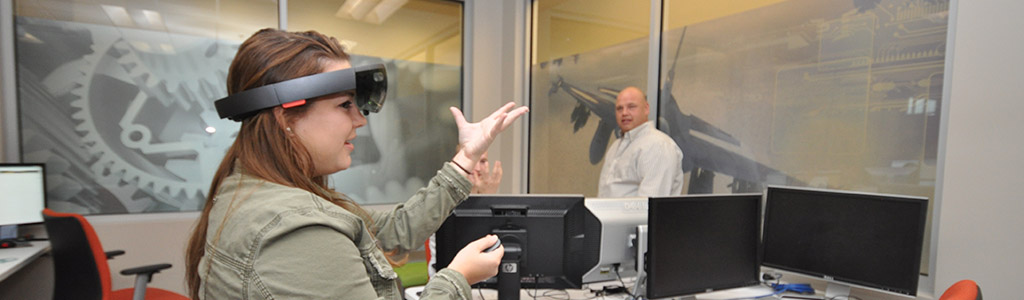
Nathan Hartman and his Purdue Polytechnic student, teaching and learning for the future

According to many of those same studies, by 2025, the U.S. will have likely experienced the creation of roughly 3 million manufacturing jobs that do not exist today and will still have roughly 2 million unfilled jobs that have been digitally transformed to require a new skill set. This scenario will create even more strain on an already burdened labor market in manufacturing. Couple that strain with new models of working, such as a borderless workforce and non-hierarchical organizations and the design and manufacture of wearable products and continuously connected devices, and one can see that an entirely new ecosystem of work is developing. One for which our current education systems and methods have but minimal preparation. Current life expectancies in developed countries point to a person born today living to be nearly 100 years old. How do we educate a person born today to exist in a world where they not only change jobs multiple times but potentially change careers multiple times?

By most accounts these days, the manufacturing sector in the U.S. is doing well, even with the recent downturn in the automotive industry. However, it is difficult to pick up a newspaper without reading something about the challenge companies are facing in hiring. According to numerous recent studies by the likes of Gartner, Deloitte, McKinsey, and others, the current manufacturing output is high, but the future looks a bit bleak. Not necessarily due to competition with low-labor-cost countries or some governmental policy per se, but to a lack of a skilled workforce coupled with rapid technological change. Most authorities peg the shortage between 2 million and 3 million manufacturing workers by 2027. Regardless of the cause, even if the worker shortage is “fixed,” it will not likely address a more fundamental trend in the U.S. people choosing other career fields over manufacturing. But before diving into a discussion about education and workforce development, let’s look briefly at the technological transformation at the heart of this predicament.

Most of us grew up learning about the Industrial Revolution – the mechanization of work to ease the load on human beings and to increase their efficiency. However, what many people may not be aware of is that we have had several industrial revolutions over the last two hundred years. Industry 1.0 began with the mechanization of work, which led to the electrification of work during Industry 2.0 in the late 1800s and early 1900s. In the early 1960s with the rise of personal and industrial computing, electrification of work gave way to the automation of work to create Industry 3.0. And as those technologies became commonplace and we saw the uses of data expand, we have arrived in the 2010s at Industry 4.0 – the digitalization of information to support the automation and computing backbones that already have been built. Not only are we on our fourth industrial revolution, but the elapsed time between the revolutions has been substantially decreasing.

In parallel with the technological gains in efficiency, accuracy, and sustainability that it is experiencing today, the manufacturing sector is struggling to transform its workforce. For every industrial revolution the world has seen, there has been an accompanying educational revolution. In the U.S. and Europe, those transformations came in the movement away from the master/apprentice model (Education 1.0) to the movement around Manual Arts and Industrial Arts (Education 2.0), which focused on basic job skills for the growing mass production economy. Over the 20th century, we saw the move towards Technology Education, with its focus on domain-specific content areas and a systemic view of technology as a discipline in and of itself (Education 3.0). The current education transformation relative to manufacturing is now focused on design thinking and a ‘system of systems’ view (Education 4.0) of developing and implementing technology and using digital data to assess, diagnose, and implement solutions to problems.

Yet, if we have had parallel revolutions between industry and education, why does the manufacturing sector find itself with such a shortage of skilled workers, and how might we begin to address this shortage? How we can adapt our Education 4.0 revolution to better address the needs of the manufacturing sector of our economy? The dawning of technologies such as additive manufacturing, high-performance computing and data analytics, generative design, and artificial intelligence means that humans will no longer have the cognitive playing field to themselves. Machines will be able to process more quickly, more cheaply and with fewer errors than their human counterpart, at least in some activities. That could make the hollowing-out of human tasks, now cognitive as well as manual, far greater than ever before. So what do humans have left? What should we prepare our students for?

Project-based Learning offers students opportunities for critical thinking, creative problem-solving, communication, and collaboration: all, 21st Century skills. This picture is from the Purdue D-Bait project at McCutcheon High School, reported in a previous blog post, It’s Not about the Lure

Demand for skills of the head (cognitive) have dominated those of the hands (technical) and to a lesser extent, those of the heart (social) over the past 300 years.  In the future, a tighter coupling will need to exist between a person’s cognitive knowledge and their technical and affective knowledge. During the first three Industrial Revolutions, the skills workers needed to keep ahead of the machines were largely cognitive. Machines were doing manual tasks and cognitive tasks were the exclusive domain of humans. However, with the rise of social networks, artificial intelligence, and the digitalization of information, Industry 4.0 threatens to change the balance of power in what had been exclusively the human’s cognitive domain. Students must be exposed to and become proficient in multiple modes of problem-solving; that is, they will need an education that prepares them to perform cognitive tasks requiring creativity and intuition. They will need to solve problems whose solutions require great (but logical) leaps of imagination. There will remain a demand for skills to program, test and oversee machines. Personalized design and manufacturing will become more common as the information needed to customize products for individuals is more readily available. A student’s ability to use social skills to execute, and when necessary, lead initiatives that require emotional intelligence rather than cognitive intelligence alone. Preparing graduates solely for cognitive skills will not be enough for the 4th Industrial Revolution.

We must build upon the traditional literacies of reading, writing, and mathematics. Students still must be able to take in information, assimilate it with what they already know, and form a conclusion. They must still be able to understand the physical and temporal phenomena expressed by modern mathematics and science. However, we must move them past simply assimilating and synthesizing information and towards interpretation and systematic decision making based on that information synthesis. New types of literacy might include:

  • Data literacy: the ability to read, analyze and apply information. Advanced data gathering and analytics tools will increase the quantity and quality of information available to people, and use contextual cues to help them in understanding what is presented to them. It will be incumbent on our students to know how to apply that information to their problem and to be able to discern accurate and useful information from that which is not.
  • Technological literacy: coding and engineering principles. Technologies have been created and used since the beginning of humankind, which is arguably one of the things that separate humans from their ancestors. Yet this new incarnation of technological literacy will enable our students to incorporate factual and procedural, process-oriented information into the physical tools and objects they design and build, thus creating a more “intelligent” products.
  • Human literacy: humanities, communication and design. Our ability and willingness to connect to fellow human beings through, and in spite of, our technologies will become increasingly important. Solving complex problems will not only require the rational theorems and postulates of our mathematical techniques, but the empathy that comes from being human, as we have yet to develop a computing technology with the human capacity to assimilate, interpret, and feel.

Finally, as we develop in our students these higher-order literacies based on digital tools and information, we must also move them towards higher-order mindsets and ways of thinking about and viewing the world. We must encourage them to embrace systems thinking, not necessarily the abstract mathematical representations of it, but the Gestaltist view that yields the ability to view an enterprise, machine or subject holistically, making connections between different functions in an integrative way. Entrepreneurship will become increasingly important, although not in the economic sense per se, but in the application of creative thinking to solve problems and take risks in implementing those solutions in our social institutions. Our students must also become culturally agile as physical, geographic borders become less and less relevant in an age of global commerce and the economic viability of singular customers. And we must encourage and challenge our students to embrace ambiguity as a fact of life and to employ critical thinking as much as possible. The habits of disciplined, rational analysis and judgment will serve them well in a world that increasingly relies on digital information and the accompanying networks to disseminate it.

The manufacturing sector and the education system that supports it cannot hide from these technological changes. It would be like trying to away from a tsunami: We will eventually be overtaken. As an educational community, we must embrace these changes, engage with the manufacturing sector, and adapt our respective curricula to meet the needs of a future and a transitioning workforce. By doing so, we can provide the manufacturing sector with the workforce it needs, and we can provide the manufacturing workforce pipeline some sense of stability in an otherwise rapidly advancing future.

‘Tis the Season to be Stressed

IMG_0546Almost the end of the semester. For high school students, the run-up to the holidays is likely to be stressful, thanks to those dreaded final exams. Guest blogger Mike Etzkorn, a math teacher who leads McCutcheon High School’s Maverick Launch program, explains why the short-term stress brought on by finals can actually benefit students–and offers some tips to help students through this and other stressful experiences. Welcome, Mike, to In an American Classroom. 
‘Tis the season to be jolly; however, for so many of our students and children, ‘Tis the season to be stressed.  Finals week is almost upon us and with it comes stress for students. The American Psychological Association conducts an annual survey of high school students relating to stress and has demonstrated that high school students are more stressed out now than ever before.  As of late, a tremendous amount of time, effort, and energy has been expended within our educational system toward helping students learn how to cope and de-stress. These efforts are necessary and beneficial, but we also need to look at the difference between acute (short-term) and chronic (long-term) stress.

Acute stress can actually have many benefits.  Richard Shelton, MD, vice chair for research in the Department of Psychiatry at the University of Alabama Birmingham, says that “low-level stressors stimulate the production of brain chemicals called neurotrophins, and strengthen the connections between neurons in the brain.” Acute stress can temporarily improve memory and motivate productive behavior.  Dr. Shelton also says learning to deal with stressful situations can make future ones easier to manage, thus teaching resiliency and grit. It’s the idea behind Navy SEAL training, he reports as well.

I like to call this concept raising our stress threshold.  The analogy I use with my students is that stress is like a muscle.  Weightlifters will “max out” when lifting, which means they take their muscles to the top edge of their limit, causing their muscles to fail.  This is a very painful and uncomfortable experience. Their muscles burn, shake, and ultimately can’t handle any more weight. After a recovery period, the next time they lift, they are able to raise their maximum weight.  Acute stress is exactly like maxing out when weight lifting. When we experience acute stress, we are maxing out our stress threshold. This is an uncomfortable experience, but once we have pushed through the temporary stressor, we are able to tolerate more stress the next time.  

When I reflect on my own educational experiences, I can recall numerous all-nighters or tear-filled nights, experiencing my own personal stress threshold max.  My first experience with acute stress occurred during my freshman year history class with Mr. Crismer. Each quarter, we were assigned a nine-to-eleven-page research paper on a randomly assigned historical figure. We were required to have three sources, and in the days before the internet, we had to dive into the old-fashioned library catalog cards. If we were unlucky enough to get one of the more obscure historical figures, it sometimes took three different libraries to find those three sources.  We were given two weeks to complete the assignment, and all the work had to be completed outside of class time. Freshman year was the first time I pulled an all-nighter to complete an academic assignment, and it certainly was not the last. Through my first acute stress experience, I learned how to power through the stress to accomplish my goal.  This particular stressor (my paper) presented itself over a two-week period, with an end in sight, concluding with the completion of the project. 

Learning how to utilize acute stress to boost grit is a lesson every student needs to learn. Academic stressors, which are acute in nature but deployed in a safe, controlled environment, are beneficial and should not be removed or eliminated.  Instead, they should be utilized to teach our students the resiliency that is needed to succeed beyond the classroom.

Although the task of writing a history paper seemed insurmountable when I was a freshman, we all know that life has challenges that are far more overwhelming.  The lessons I learned in resiliency during my high school years helped me fight through a literal battle for my life: cancer. At age 24, I was diagnosed with chemoresistant metastatic cancer.  I spent nine months enduring surgery, traditional chemo, more surgeries, and high dose second line chemo. This nine-month experience not only took its toll on me physically but also mentally. Without my past stress experiences raising my stress threshold, I would not have been able to handle the challenges that presented themselves during that fight.  

As a parent of three adult children, I look back at whether or not I did enough to prepare my children for the stress of adult life.  I always had to ask myself: Did I push my children enough? Did I push them too hard? Did I help them navigate the stressors of adolescence so that their stress threshold was raised enough for them to have the grit necessary to succeed in life?  Were the tear-filled all-nighters worth it? Did the “No, you cannot quit the team, you will finish what you started. Suck it up buttercup!” speech teach them to fight through adversity? Even though the experiences were painful for them, and painful for me to watch, was it worth it?  As educators and parents, it is our responsibility not to remove the stressors from our students’ lives, but to help our students raise their stress threshold in a safe and controlled environment. So as we progress into finals week, let’s utilize this time to help prepare our students for what is to come after they leave the safety of education.  

Ways to help your student through the stress associated with Final Exams:

  • Remind them that their stress is temporary.  
  • Encourage them to put forth their best effort.  “If you do your best, you can walk away holding your head up high no matter the result.”
  • Help your student maintain a healthy balance between work and de-stress time.
  • Be supportive and encouraging, remind them that you are proud of how hard they are working.  
  • Remind your student that healthy eating and sleeping habits are just as important as studying.  
  • Urge your student to ask for help when they need it, share with them a time when you had to ask for help.


Thanksgiving: For My Former Students

IMG_3253

Posting this piece at Thanksgiving has become a tradition.  Once more, the holiday gives me an opportunity to say thank you to my former students. You’ve enriched my life beyond measure, and I am grateful for the time we spent together and for the contribution you are making to our community and to the world.  Was it worth it? All that time and energy and love? The answer is yes. Every single day, every single year. 

You have sold me carpet and cleaned it, accepted my dry cleaning, butchered the meat for my table, helped me find clothes in the right size,  checked out my groceries at the supermarket, and brewed coffee for me at Starbucks. I’ve regularly walked with one of you in the March for Babies, and I’ve removed my shirt in the doctor’s office so another of you could give me a shot. I’ve run into you in bookstores, grocery stores, elevators, and train stations, been in attendance with you at concerts and plays, and even been hailed on the street in a distant Western town. One of you approached me in an airport and went on to describe your work repairing the wind turbines in a county adjacent to ours.

Some of you have been wounded in war, and others of you are still serving. I’ve worried about you in Vietnam, in Iraq (I and II), in Afghanistan, and in other troubled spots around the globe. Recently, one of you died serving this country. Our whole community mourned, and that year, in your name, students at our high school collected items for Care Packages for soldiers stationed around the world.

Some of you have worked for my husband or me. One of you is a contractor who remodeled my husband’s lab; another was his lab technician. Two of you have taken care of our yard during the summer when we have been on vacation; another has walked our dogs.  You’ve waited on us in restaurants; you’ve hauled boxes for us when we remodeled.

I’ve worked with one of you on a research project and together we’ve served on the board of a community organization.

Many of you are my Facebook friends; some of you read this blog. Some of you follow me on Twitter.

You’ve substituted for me in the classroom, and a great many of you are teachers yourselves. One of you is an author and instructional coach; another several of you, school principals. Some of you are nurses; some doctors. At least one of you sells real estate, three at least are lawyers, and many of you are college professors, even Department Chairs at your universities. Some of you sell produce at the Farmer’s Market; others farm on a larger scale. I can count among you a writer, a chef, a veterinarian, and a musician.  A television personality and a museum director. A singer and songwriter, a pitcher for the Padres and another for the Marlins. A videographer in Hollywood. A welding instructor. A dancer. Several of you are pharmacists. One at least is a politician, two of you worked as field managers for candidates in our last election. One of you is a personal secretary to someone in Germany.  Beauticians and therapists and specialists of all kinds. An artist and a computer design expert. A journalist and a newspaper editor. One of you was a nun, but left your order; one is a priest who has stayed. Managers, retailers, and business owners. Police officers and firefighters, automobile salespeople and automobile mechanics. Electricians and plumbers and heating and cooling experts. You work in personnel and transportation, retail and manufacturing. You are receptionists and cashiers.  Peace Corps volunteers and public relations specialists. Computer programmers, technicians, and web page designers. Executives and line workers. Bus drivers. Cafeteria workers. Lab assistants and physicians’ assistants. So many of you I can no longer keep you all straight.

Some of you came to this country as refugees and immigrants, only to meet new obstacles here. You worked hard and long to weave yourselves into the fabric of this nation, making me and your families proud of all you have accomplished. Many of you had different struggles–you faced challenges no one should have to–but you had determination and the will to succeed. You still work hard, all of you, every single day, to make this world spin round.

Teachers often wonder what becomes of their students, the youth upon whom they have lavished so much time, attention, and love. I am surprised when I list you out like this, and I see immediately what I didn’t wholly envision would happen when you were before me in my classroom year after year after year.

When I knew you, you were children. But you have grown up, evolved, moved past Crazy Hat Day, experimental make-up, video games, and babysitting. Past blue hair and nose rings, past balloons on lockers and crepe paper streamers suspended across hallways. You have come of age, turned your promise into purpose.

You haven’t all won prizes, achieved fame, or made a fortune, but you all make me proud. I had a hand in helping you learn the skills you need to keep our universe spinning. Now you help me. You ease my life, keep me safe, and bring me joy. I’ll take that.

And give thanks.

It’s Not About the Lure

ELECTROFishing

  • Aquarium net
  • Transparent plastic containers
  • Plastic buckets
  • Golf balls
  • Magnifying glass
  • Ice cube tray
  • Parametric software
  • 3-D printers

and

  • Students in Honors 9 Biology, AP Biology, and Principles of Engineering

Put them all together and what do you get?

Fishing lures!

Except, it wasn’t about the lures.

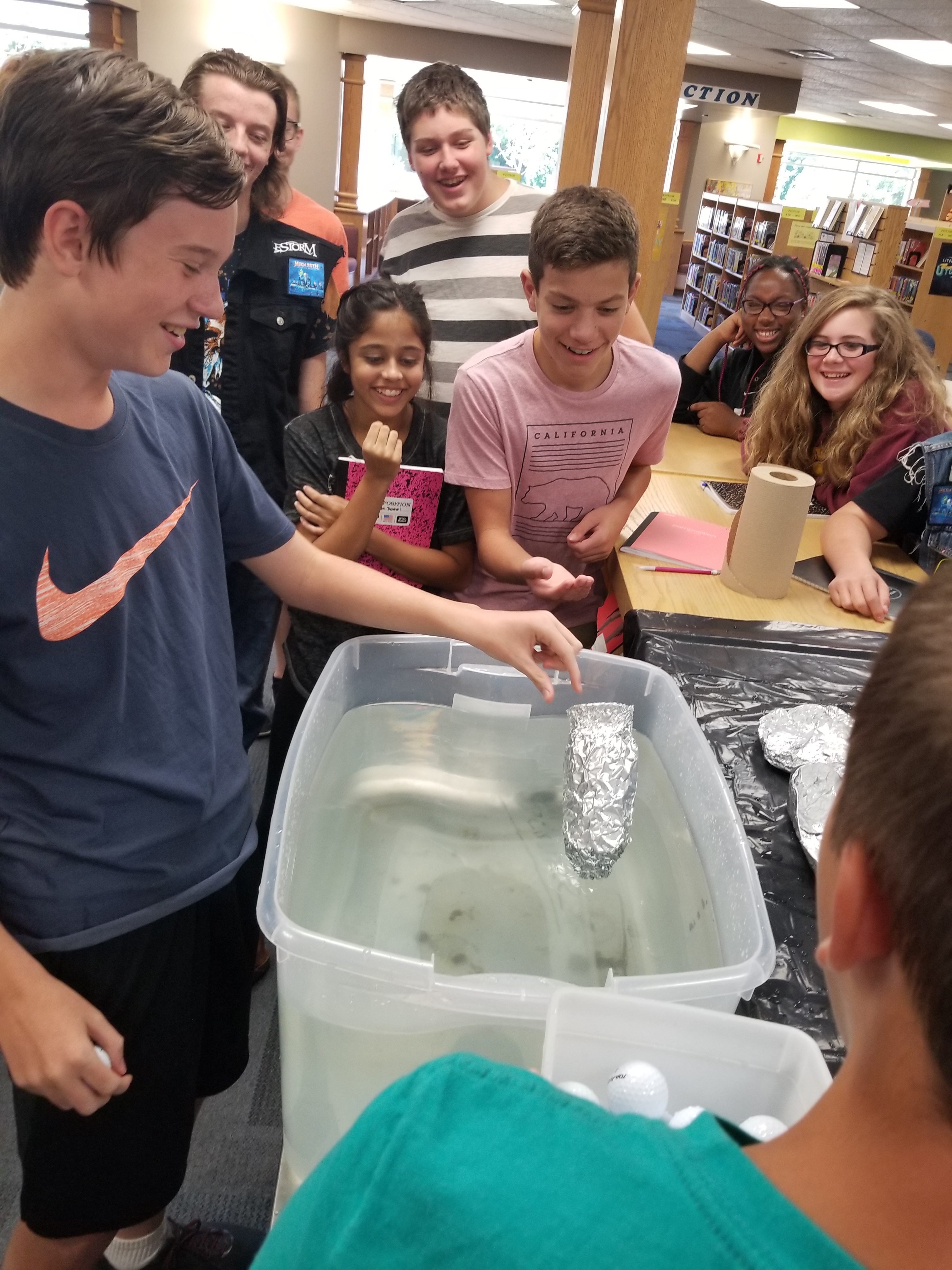
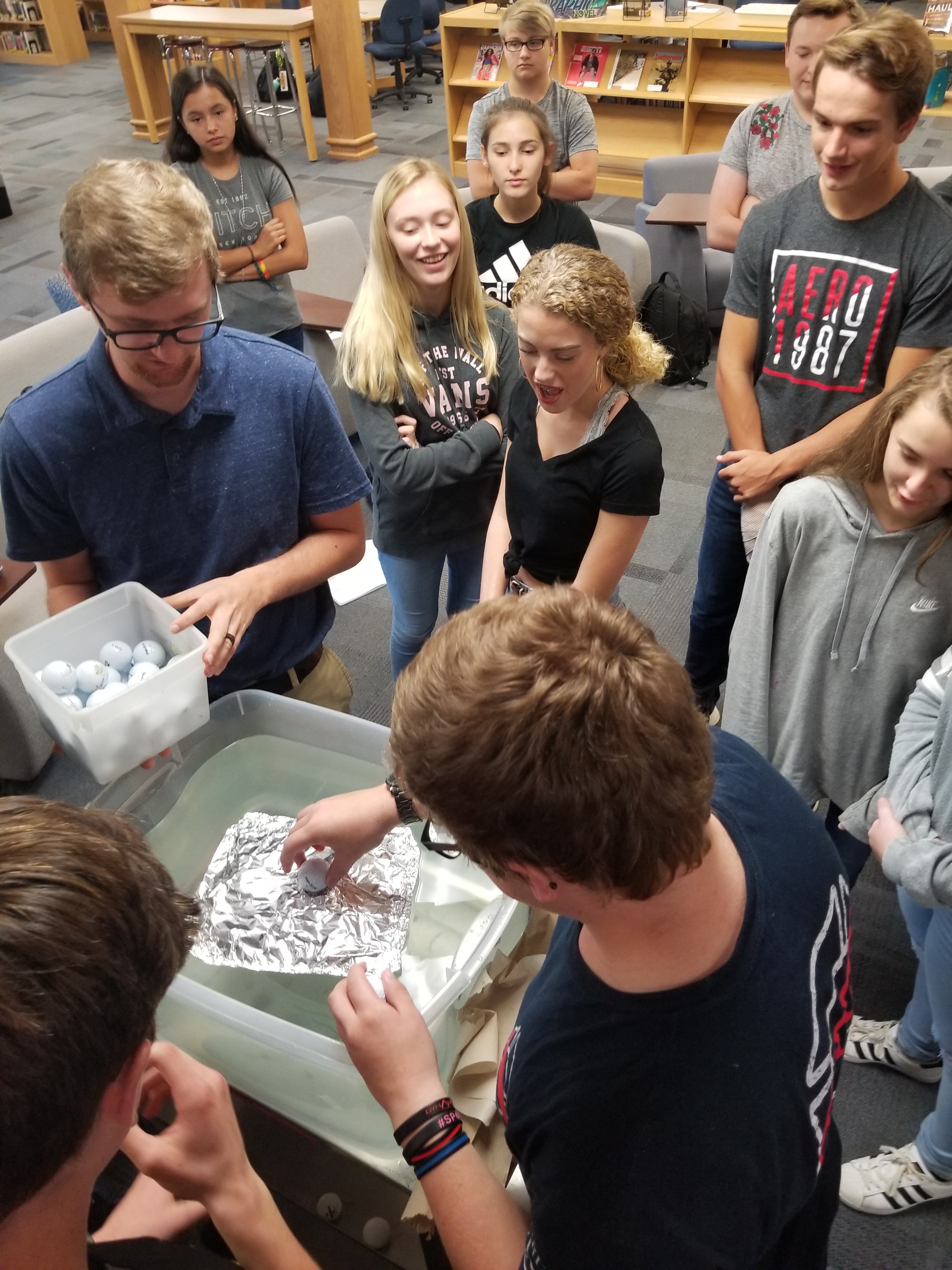
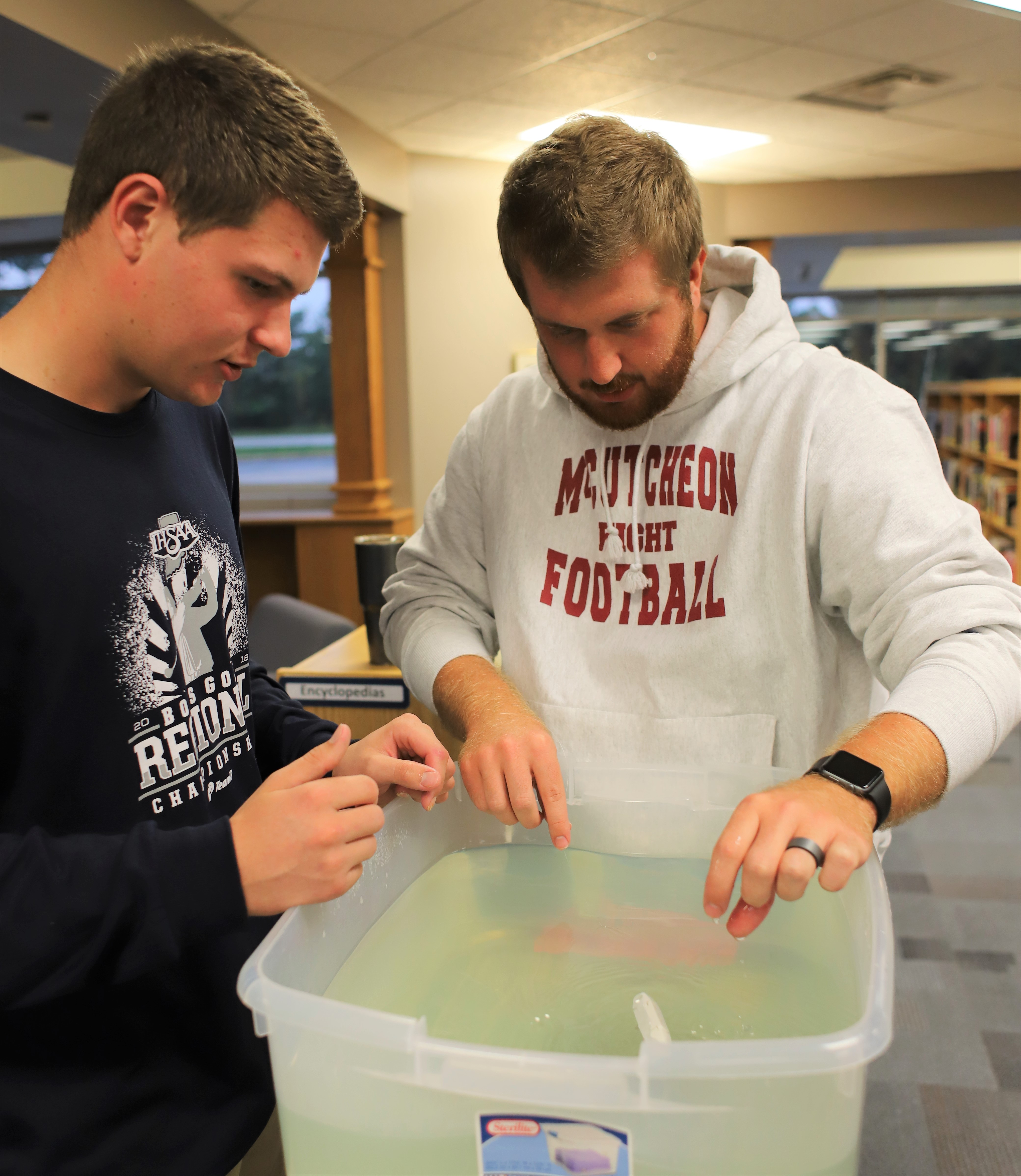
Teacher Zach McKeever supervises as students float golf balls in tin foil boats to understand buoyancy

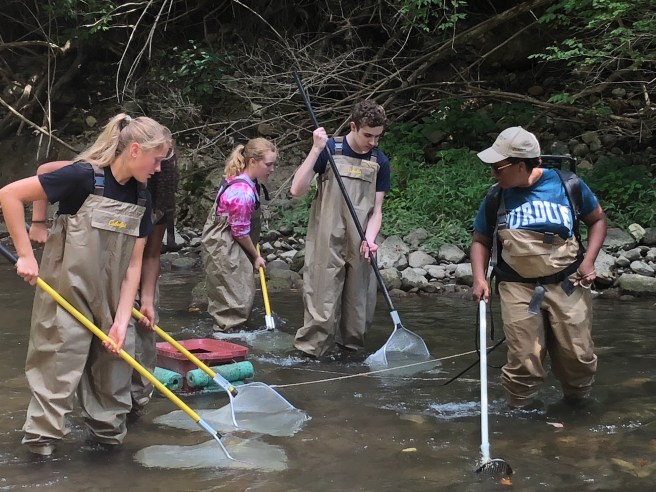
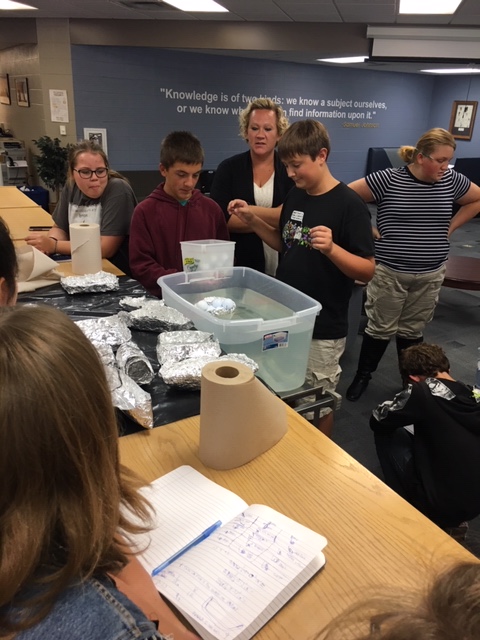
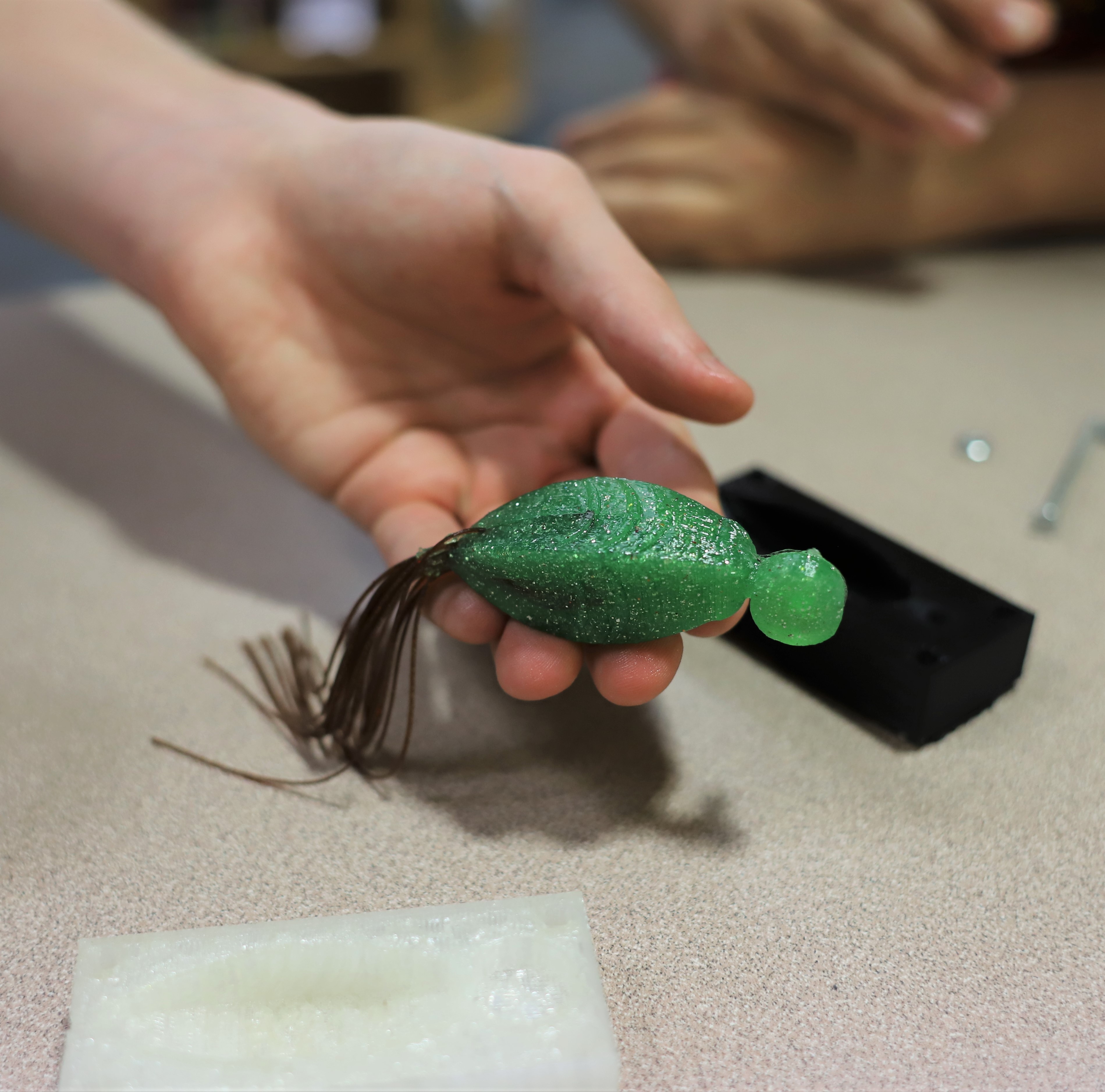
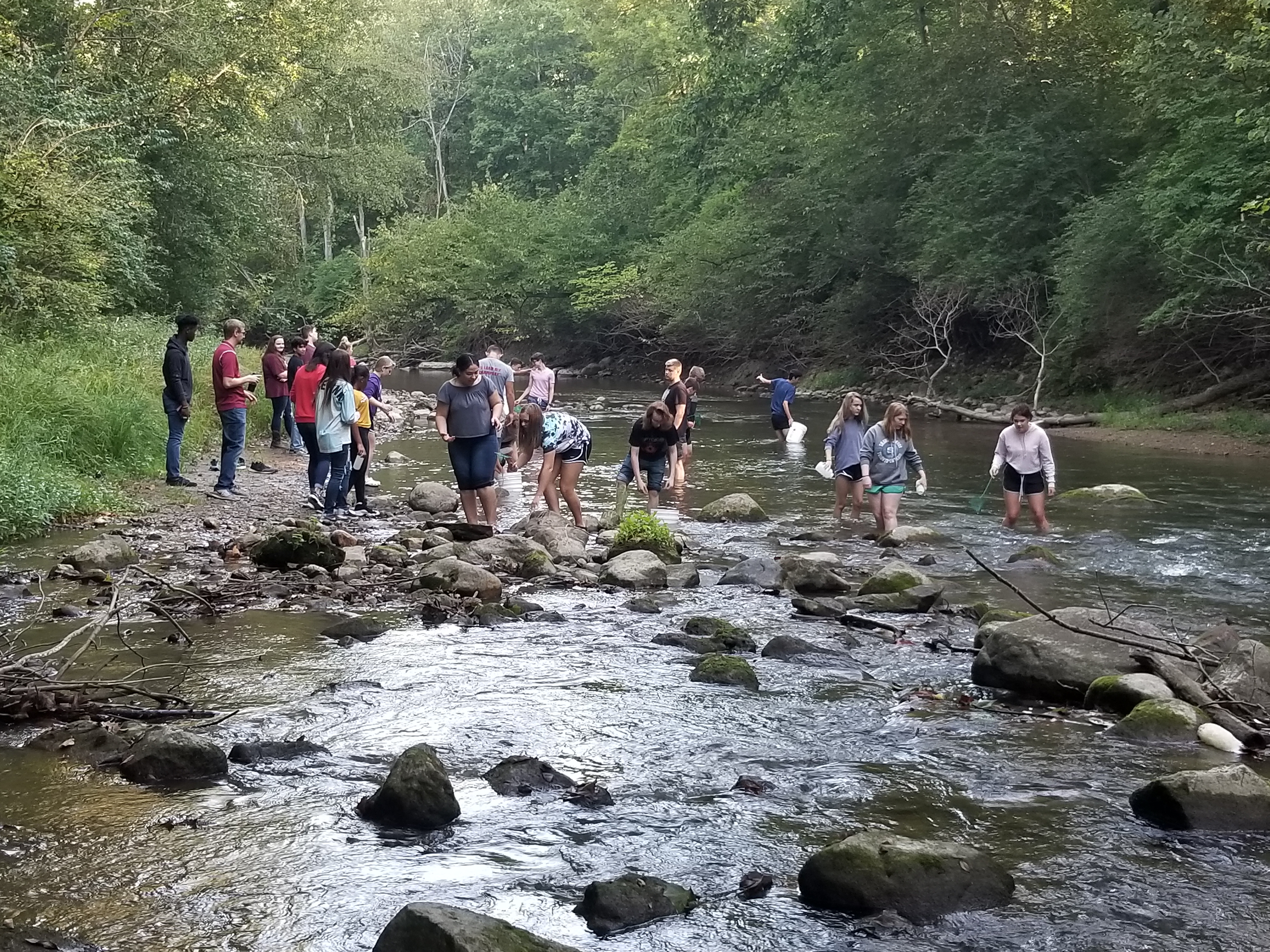
Teams of students from these three classes at McCutcheon High School joined forces to learn about the fish that swim in Wea Creek, the insects that attract them, and the design process engineers use to create any new product. The standards addressed by this bioengineering module pulled from biology, physics, math, technology literacy, and environmental systems. The students spent time at the creek in waders, capturing and identifying fish through electrofishing techniques guest instructors from Purdue University showed them. They identified aquatic insects–also caught in the creek that runs behind our school–and preserved them in transparent containers to learn about biomimicry. Using a decision matrix to guide their design choices, the student teams created fishing lures that looked and moved like the insects they’d observed. They floated golf balls in tin foil “boats” and used their math skills to determine the buoyancy of their designs. Ultimately, the students used Inventor, a parametric modeling software program, to visualize a prototype. The most promising prototypes were printed using a 3-D printer.

20180911_121840When they weren’t outdoors, the teams met together in the Media Center where large round tables and lots of space facilitated consultation and collaboration. The four teachers, whose schedules had been specifically arranged to accommodate this project-based learning endeavor, floated among the groups. The large space also improved the efficiency of the project. “It was much easier to walk between tables to answer a question than to send an email from one classroom to another,” commented engineering teacher Zach McKeever.

Finally, each team made a PowerPoint presentation of their experience, including a reflection on their performance in terms of communication, creativity, collaboration, critical thinking, and computational thinking. An expert angler was present for some of the final presentations and inspected the lures close-up. The students listened intently to his critiques.  One group was surprised when he told them, “You could market this if you’d make just this one little change.” 

And then, on a warmish October Saturday, they tried out their lures. Total catch: a few nibbles.

20181006_093239

But that’s all right. It wasn’t about the lure.

In their wrap-up discussion, students (predictably) commented that they liked going outside and enjoyed the fishing expedition at the end. They wished they’d spent more time at the creek! They appreciated the hands-on learning and real-world application of their learning. They enjoyed the guest lecturers from Purdue who opened their eyes not only to a new way of fishing, but to the presence of specific species of fish as an indication of water cleanliness, to the connection between bioindicators and our own drinking water, and to watershed ecosystems in general.

Students test their hypotheses about the number of golf balls their vessels will hold as teacher Amanda Cox looks on

Some students did say they prefer a more traditional approach to learning: They wanted textbook learning first, then the application. However, the majority of students said they liked putting the pieces together even though they experienced some anxiety at first when they weren’t sure what was going to happen, how they would get from the assignment “Create a Lure” to the final product without the familiar front-loaded vocabulary lessons, textbook assignments, and the quizzes and tests that usually accompany traditional classroom instruction.

Other students had suggestions for their teachers for improving the unit’s design. The project had been set up to differentiate for experience (Honors 9 Bio and AP Bio) and course credit (Engineering vs. Biology). The AP Bio students, for instance, experienced the electrofishing and were responsible for conveying that information to the rest of their team. The engineering students used Inventor–and explained it to the others. The Honors 9 students did the insect study and relayed what they learned to the rest of their team. That structure led to some problems of communication, so the students suggested ways to ensure better communication and more accountability for each team member. 

Many students commented at length on the communication and collaboration skills they had needed to develop in order to be successful. Some teams reported, quite frankly, that they hadn’t started out working together well–but they overcame those obstacles because they had to. That admission–and the ultimate resolution of the problem–brought smiles to the faces of the teachers because, of course, learning to work together as a team was one of their goals. 

The principles of design apply across the board and collaborative problem-solving among individuals with different areas of expertise and different perspectives will always be the case. For example, Mr. McKeever explained, civil engineers may be commissioned to create a dam. That will certainly disrupt the ecology of a river, so the goal will be to design a structure that minimizes impact but still does the job of holding back the water. Chemical engineers may develop vaccines and the packing materials for those medications. They’ll need to take the impact of chemical emissions, waste, and the product itself into account as they develop the product.

“The biggest takeaway for me,” Mr. McKeever continued, “was the relevancy. The biology part helped the students create lures for a specific fish in a specific environment, making the whole project much more authentic. Without the biology component, the assignment would have been ‘Design a lure you think will catch a fish’.”  Not nearly so relevant and not nearly as challenging. 

For students who have never experienced project-based learning, the first venture into this way of learning can be intimidating.  But in the end, biology teacher Abi Bymaster asserts, “This project forced students to feel uncomfortable, to ‘not know the answer,’ and they couldn’t just look the answers up on Google. However, it is because of this discomfort that they learn; this is what I love about PBL.”

“Learning ‘this way’ made the learning real,” many biology students said in summary. They liked the independence, the taking charge of their own learning, the creativity expected and allowed. The students clearly saw that while the biomimicry and the buoyancy achieved by the unique anatomy of fish were concepts important to understanding predator/prey relationships, understanding the whole ecological system–and the ability to generalize that to other systems–was the greater lesson. 

Teacher Mike McKee watches as his student tries out a lure

No one misunderstood the real learning goals of this endeavor. It wasn’t about the fishing lures. It was about the interdisciplinary nature of learning and the teamwork needed to pull a project together, hallmarks of project-based learning: authentic experiences that reflect real-life problem-solving and decision-making.

This project-based learning experience has a formal name: Designing Bugs and Innovative Technology (D-Bait). It is one unit in the TRAILS curriculum designed by Jeffrey Holland, Todd R. Kelley, Euisuk Sung, and Nathaniel W. Cool at Purdue University and supported with funding from a National Science Foundation grant. The project was new this year to two of the four collaborating McCutcheon teachers, all of whom were trained during previous summers. All four of the high school teachers are looking forward to doing the project again next year–and implementing lesson design modifications suggested by their students, the bioengineers.


Under Discussion: Reciprocal Teaching

In time for this week’s workshops on Reciprocal Teaching, here’s a post from two years ago that spells out the basic strategy and offers some variations that you might like.

Sarah Powley's avatarIn an American Classroom

Here’s a problem that teachers have to deal with all too often: Kids come to class not having read the assigned text, or chapter, or article.  What to do to move forward?

The solution for some has been to do an end run around such assignments by having the students read the piece in class instead. That takes a lot of instructional time and leads to strategies like Round Robin Reading (RRR) and its cousins, Popcorn Reading and Combat Reading.

RRR is not a comprehension strategy; it’s a management tool.  Kids keep quiet and listen because they might be called on next.  Worrying that they might get called on next means they’re not paying attention to what is currently being read. If the teacher is obvious about who’ll read next, the students know when their turns are coming and are rehearsing while someone else is laboring away at her chunk…

View original post 1,191 more words

Summertime, Summertime

We are almost here! Enjoy, enjoy, enjoy. Here are 50 ways to do that and a few professional things to do as well.

Sarah Powley's avatarIn an American Classroom

A few of the new teachers I’ve coached this year approached me when school was ending to ask what they should do over the summer to prepare for next year. I started this list with suggestions for their professional task lists…and then I just couldn’t stop thinking about what else I’d recommend. Maybe I was dreaming about what I plan to do?

So first, the professional:

1. Assess your challenges and spend some time learning about these areas of instruction.  Is it an aspect of your curriculum—say, grammar—that you’re weak on?  Study up on that.  Is your repertoire of instructional strategies slim? Learn about some new ones.  Try Jennifer Gonzales’ The Cult of Pedagogy blog. Do you need to sharpen  your classroom procedures?  Read The First Days of School or THE Classroom Management Book by Harry and Rosemary Wong.  Polish the procedures you already have in place or think through…

View original post 981 more words

National Treasure

Never out of date, especially important on this date: Teacher Appreciation Week!

Sarah Powley's avatarIn an American Classroom

To and for all the amazing teachers I know during this, Teacher Appreciation Week: Our world is better and our students’ lives are richer because you have been a classroom teacher. Thank you for all you do every single day.

It’s fashionable right now to blast educators, to focus on data-specific measures of effectiveness, and to prescribe corporate take-overs for failing schools. The critics say “failing schools,” but that’s code for failing teachers. The critics ought to come with me when I am in a school in my role as an instructional coach.

When I enter my colleagues’ classrooms, I am quickly swept up by the lesson—enthralled by the teacher, captivated by the content, and excited to be on the other side of the desk, learning.

In the past month, here are some of the places these fabulous teachers have taken me:

  • To Austria in 1877 when two men stole Haydn’s head from his grave…

View original post 1,327 more words

An Uncommon Interface: Little Kids, Big Kids, and Computer Technology

A few weeks ago,  the children who attend McCutcheon High School’s pre-school class (Creative Corral) and the high school students in Computer Repair and Maintenance (CRAM)–the students who fix the computers for everyone else in the school–came together for a morning of activities the teenaged students called “Pre-TECH.”

Mrs. Arrika Yoder’s Early Childhood Education class at MHS meets every day. In the morning, the students work in the pre-school that is housed in the high school building. In the afternoon, they learn about careers in education, plan lessons, discuss issues, and gain as much exposure to the world of education as they can. These students are on track for careers as educators, day care providers, pediatric nurses, and child psychologists. Some will retake the lab portion of the class next year; some will become cadet teachers in our elementary and middle schools.

Mrs. Christina Bennett’s CRAM class meets every day in a classroom that, years ago, was the school’s only computer lab. Hers are the students who repair the Chromebooks and laptops that students at MHS carry with them from class to class and take home at night. The CRAM students are exploring careers in the computer technology industry: They will become our programmers, technicians, and web designers. They will be the individuals the rest of us will rely on to stay connected, current, and cybersafe.

The collaboration between these two groups really began a year ago when Mrs. Yoder asked the CRAM students to show the pre-schoolers how to use the apps on the iPads in the pre-K classroom. This year, the CRAM students, under Mrs. Bennett’s direction, decided to go giant steps farther and set up learning stations—a format the pre-schoolers would understand—to show the children more about technology.  Just like teachers would, the CRAM students spent one day each week for three weeks clarifying their learning goals and then designing and setting up their stations.

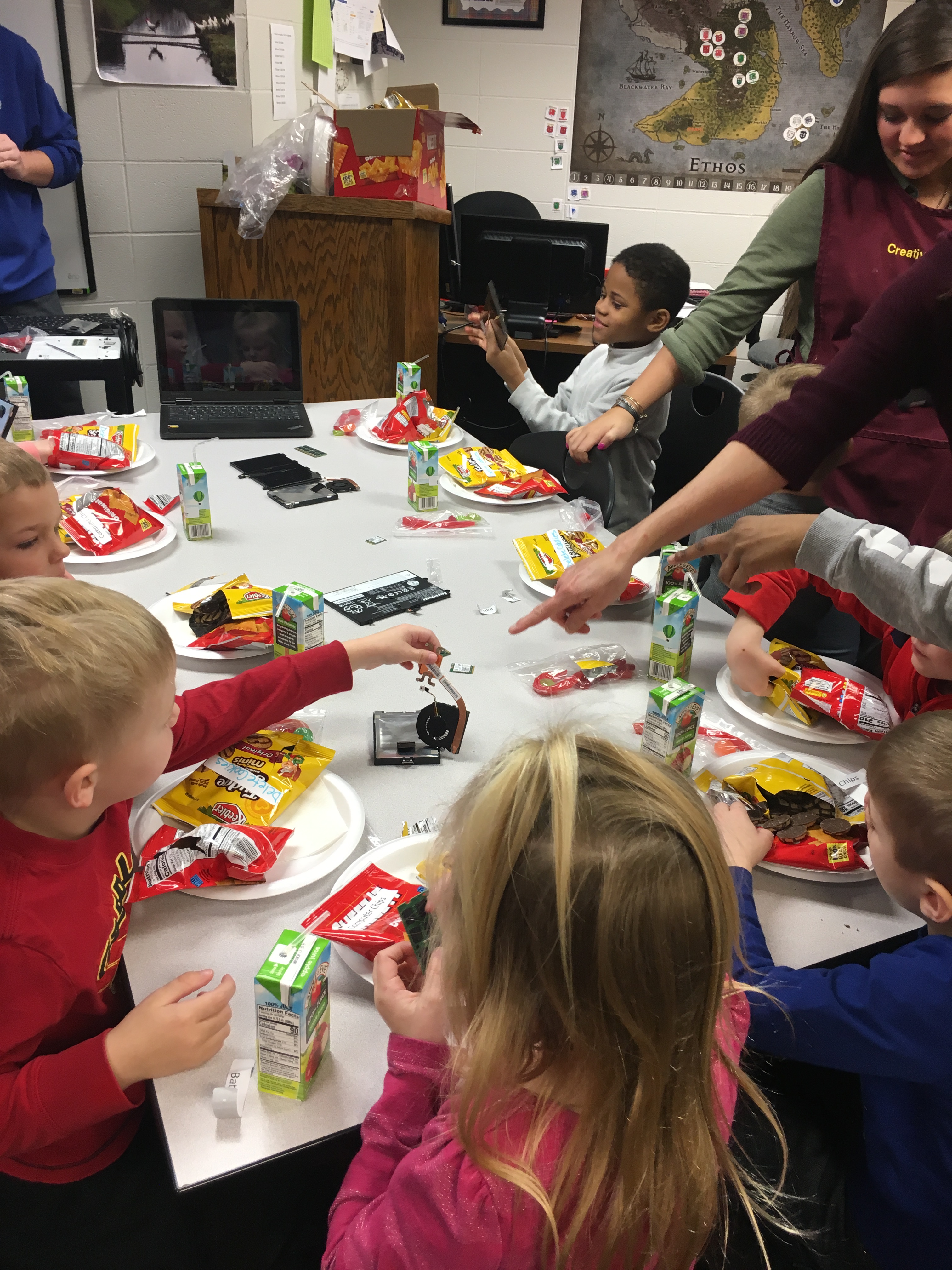
On the appointed morning, the preschoolers, accompanied by Mrs. Yoder and the Educational Careers students who are their teachers, filed into the CRAM room.  Tables had been set up for snacks, and various computer parts—a motherboard, a flash drive, a keyboard, a chip—were used as table decorations. As the children munched on their snacks, one boy explained the function of each computer part. “The motherboard is the heart of the computer,” he told them, and encouraged the preschoolers to play with the decorations. They immediately picked the items up and began manipulating them. 

One boy transferred the keyboard directly to his lap right away. He began moving his fingers across the keys in imitation of what he’d undoubted seen adults do. “What are you typing?” I asked him. 

“My password, “ he replied knowingly.

He didn’t share it with me.

After snacks, the students rotated through the five stations: Coding, Virtual Reality, Fiber Optic Cabling, Repair, and Customer Service.

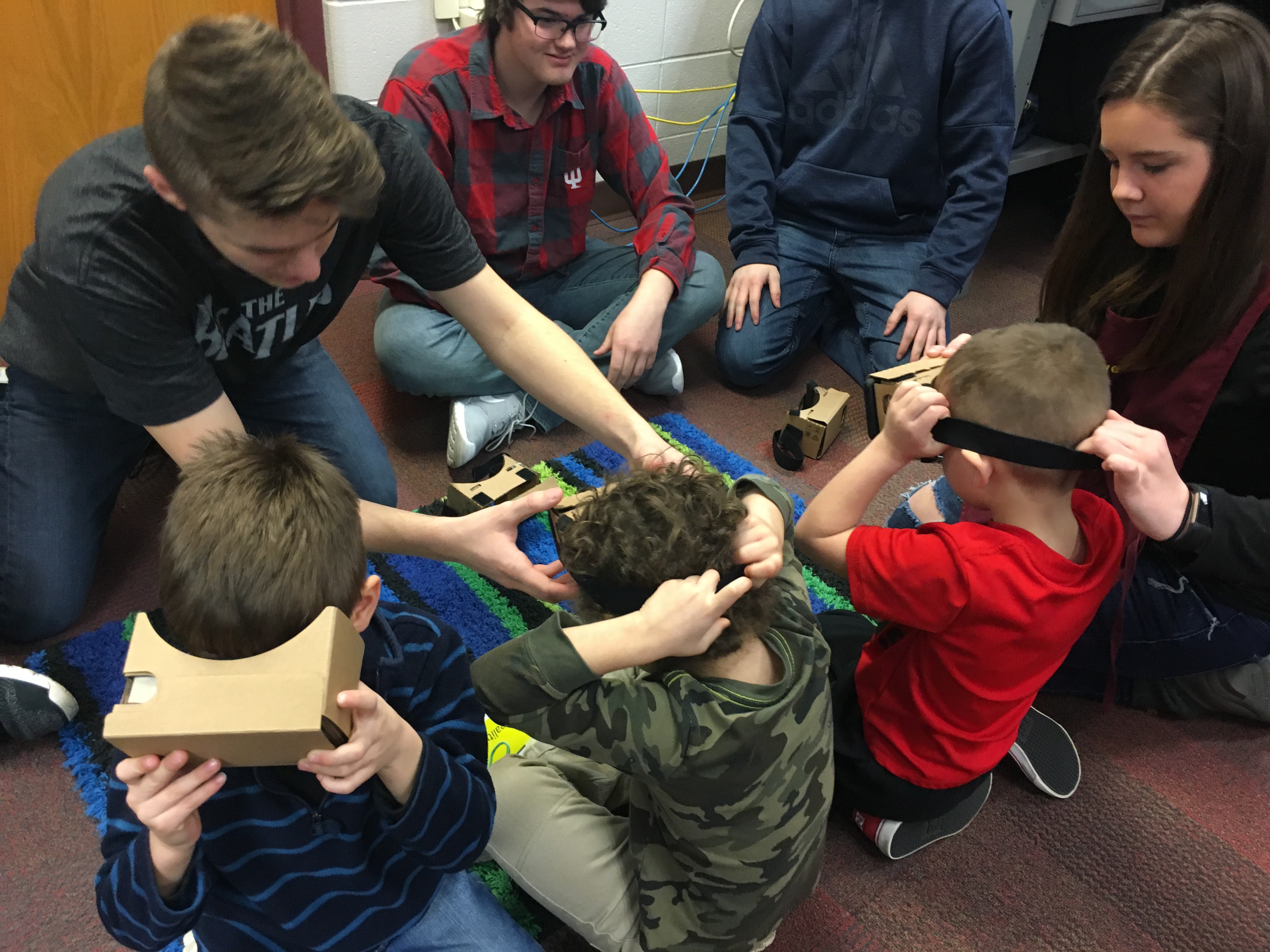
At the Virtual Reality station, students donned 3-D viewers to experience 360 degree vision. The CRAM students in charge of this station had found a Virtual Reality roller coaster game for the students to view and play.

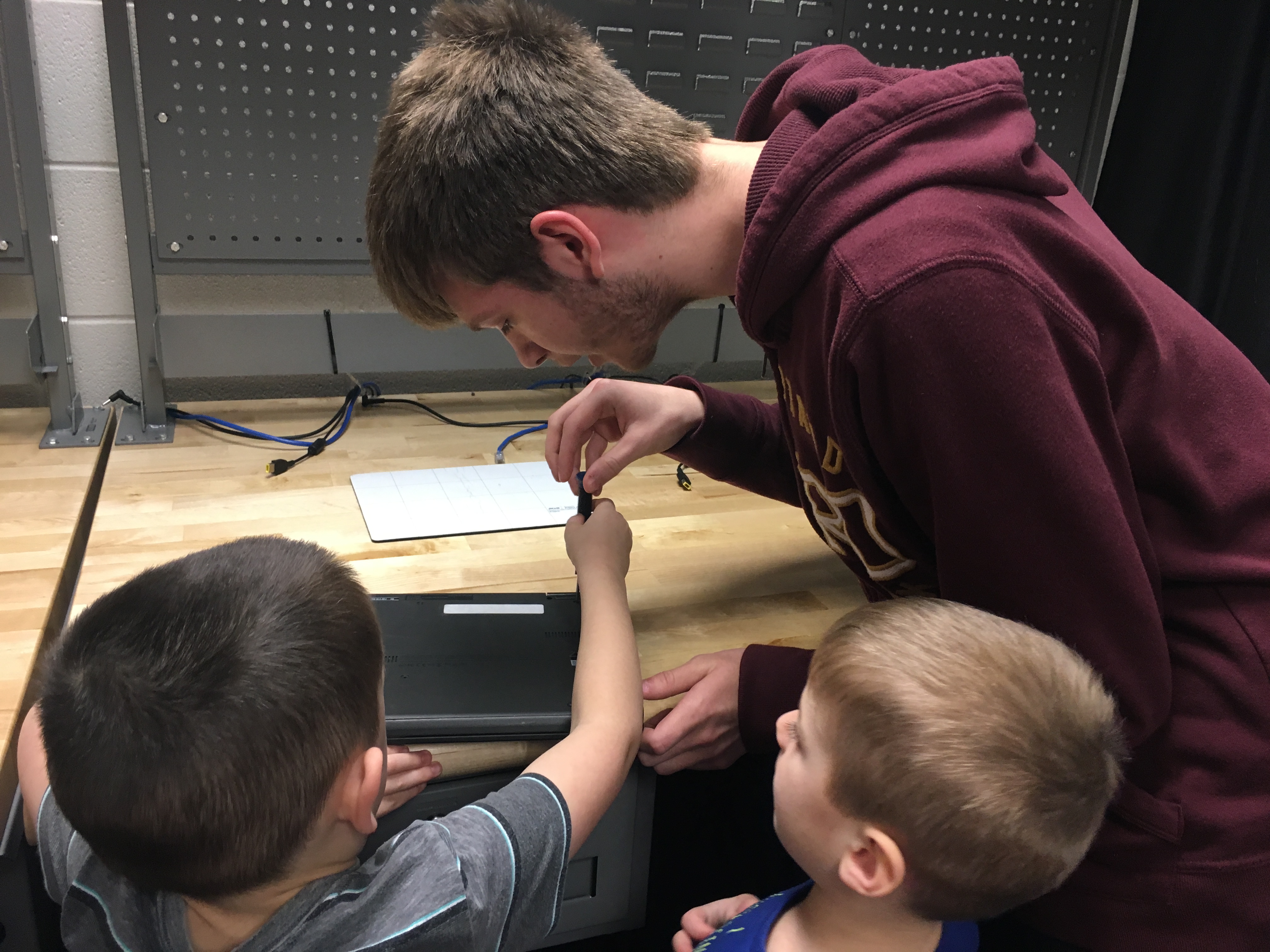
At the Repair Station, the pre-schoolers used screwdrivers to remove the computer cases. At Customer Service, they learned how to check in a computer for repair and then to check it out again. 


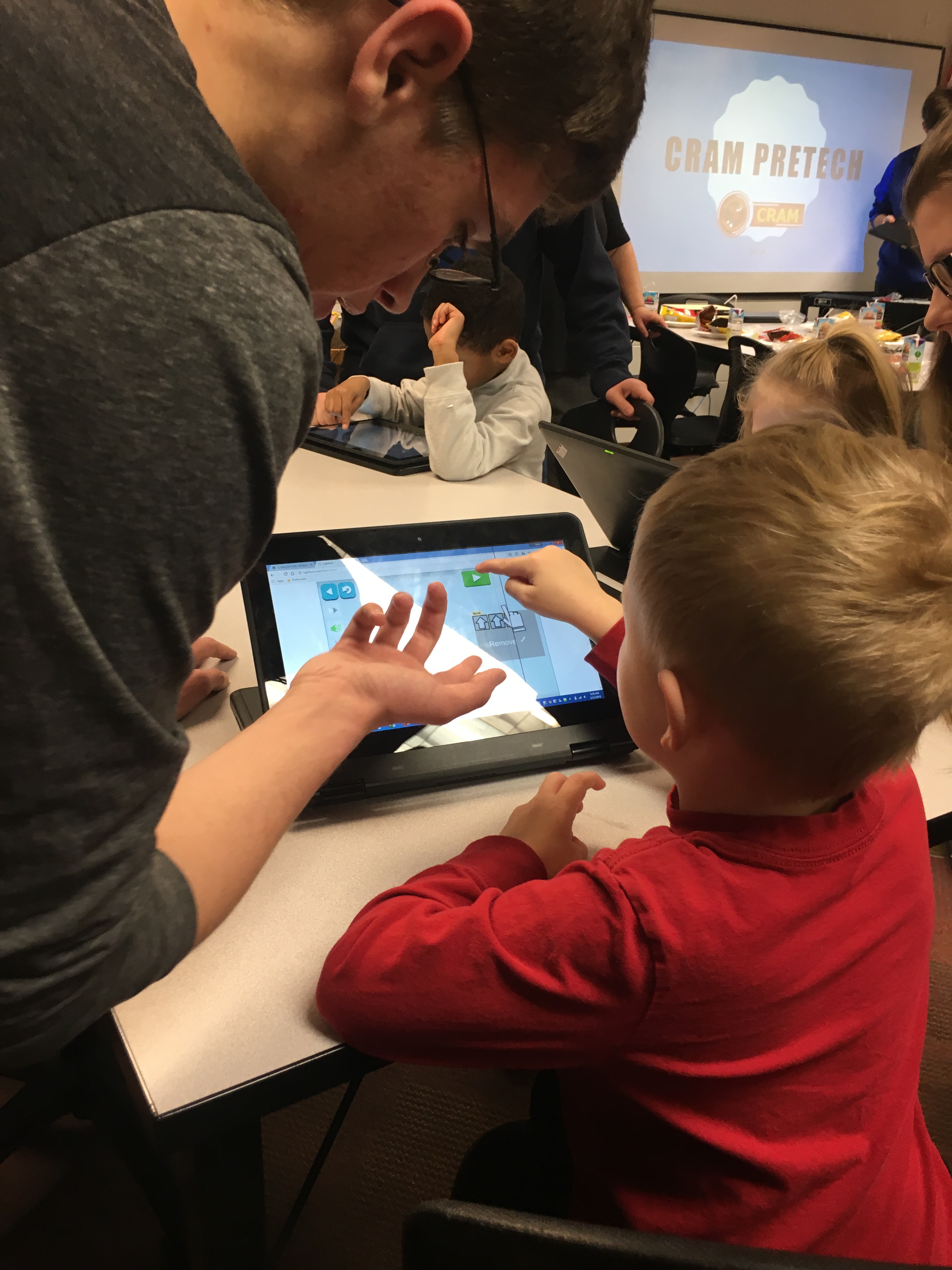
For the Coding Station, the CRAM students had gone to Code Academy to find a game that was user-friendly for pre-schoolers, age appropriate, and still would teach the children the fundamentals of coding. What they found was a game that used blocks. Using a simple set of instructions, the children moved the blocks around on the computer screens.

Most complex of all, though, was the Fiber Optic Cabling Station. There, the pre-schoolers encountered plates of jello squares with cookie cutters beside them.  The CRAM students illustrated the way light travels through a cable by directing a laser light through the jello. When the pre-schoolers cut the jello squares, the light was trapped by the twists and turns of the shapes. Even a knife mark on the jello altered the line of light. The effect was even more pronounced when the youngsters entered a tent set up under the table. The pre-schoolers were intrigued. They understood that a straight, stable cable with no impurities or kinks was needed to transmit information. They also noted that the orange jello worked the best, the green not so well.

Before the morning was over, the CRAM students conducted a mini-evaluation of their learning stations, asking the pre-schoolers to rank order the Pre-Tech learning stations. The Virtual Reality Station came in first: The pre-schoolers thought it was the most fun. The jello station came in second; Computer Repair, third.

During their time in the CRAM room, Mrs. Bennett took a Polaroid photograph of each pre-schooler in a photo booth that was decorated with discarded CDs. As they were leaving at the end of the morning, each child received a bag of favors.  Mrs. Bennett had saved the anti-static bags in which computer parts are transported; these became the treat bags. Inside, each pre-schooler found his or her photo glued to a discarded floppy disc, a computer coloring page, 1 big marshmallow and 8 little ones (1 byte = 8 bits), licorice ropes to remind them of cabling, and a few other clever souvenirs of all they had learned that morning. Undoubtedly, computer talk dominated dinner table conversations that evening! 

Later, when I interviewed the CRAM students, I asked what they had learned from the experience.

Zach told me that he was surprised by how much the pre-schoolers already knew about technology. I smiled, remembering the boy who had so quickly put the keyboard in his lap.  

Nikaya was amazed at the children’s reactions to the laser light. “They were so excited,” she said. “I was not expecting that.”

Malachi said he had learned how to interact with kids, and that prompted a discussion about the emphasis Mrs. Bennett has put on learning how to talk to people with different levels of understanding of technology and with people of different ages. “Your audience could be anyone,” she tells her students. “You have to be able to communicate with people with all different levels of experience in ways they’ll understand.”

Mrs. Yoder said that her high school students, who spend a lot of time designing and sequencing instruction themselves, were impressed with the lesson planning the CRAM students had done.  

Mrs. Bennett confirmed that and summarized the experience for the CRAM students this way: “They had a great time because the kids did.”

That’s the wonderful thing about this uncommon interdisciplinary collaboration: Not only was this a great learning opportunity for all of the students–the Educational Careers students, the CRAM students, and the pre-schoolers–it was a whole lot of fun as well!

At the Customer Service counter